From plant dyed wool samples to data-driven colortraps
I dye wool with plants. What began as a way to document my own tests slowly turned into a database, and now into a book.
Dyeing was never only about the color. Just as much of the appeal was in the structure around it: enough tests to trust a pattern, code that processes them the same way every time, and a way to turn hundreds of samples into something comparable, like an average color per plant.
One decision runs through the whole project: using dark wool as an active color, not a background. Overdyeing white wool to get a dark shade costs more dye. Blending in already dark wool doesn't, which makes dark tones both cheaper to produce and more sustainable. Dark wool is usually too coarse for clothing, but that's no problem for interior textiles like rugs.
The same logic extends the palette further. Colors come from mixing plant pigments with each other through overdyeing, but also from mixing wool colors through carding. Both are part of the same color space.
-
20
plants
-
82
dye tests
-
107
dye baths
-
963
color samples
Color space
Finding the right color space took a while. I started with CIELAB and HSB, largely because I was already working from Photoshop: LAB for its perceptual lightness, HSB for its hue axis. Eventually I moved to OKLCH, which combines both of those strengths and adds chroma, a direct measure of saturation.
OKLCH describes a color with three values: lightness, chroma, and hue, the angle on the color wheel. Unlike LAB, shifting lightness in OKLCH doesn't quietly shift the hue too, which matters when the whole point is to build a smooth, trustworthy gradient.
Getting there starts with photography, not code. Samples are shot with a Fujifilm X-T3 on a custom light table I built myself, glass over LED lighting, so even the loosely woven gaps between threads photograph as true cutouts. Two lights, always in the same position, keep every shot consistent. Colors are calibrated against a Calibrite ColorChecker Passport in Lightroom, then exported to Photoshop, where an action determines each sample's average color. Those colors are saved into Adobe Libraries and exported as the manifest that feeds the database.
From tests to database
The project is organized around tests. Each test is a grid of nine woven samples, following a structure borrowed from Charles Hayter's 1826 treatise A New Practical Treatise on the Three Primitive Colours: light at the top, dark at the bottom, two colors blending across. In practice that means white wool at the top, dark wool at the bottom, and two dye bath variations across the left and right side, blended together in the middle column.
The database holds more than color. Every recipe lives there too: which plant, how much dye relative to the weight of the wool, at what temperature, for how long. I also overdye, mainly with madder, indigo, and walnut, which is where the palette really opens up: dyeing wool once, then again with a second plant, layers color in ways a single bath can't reach.
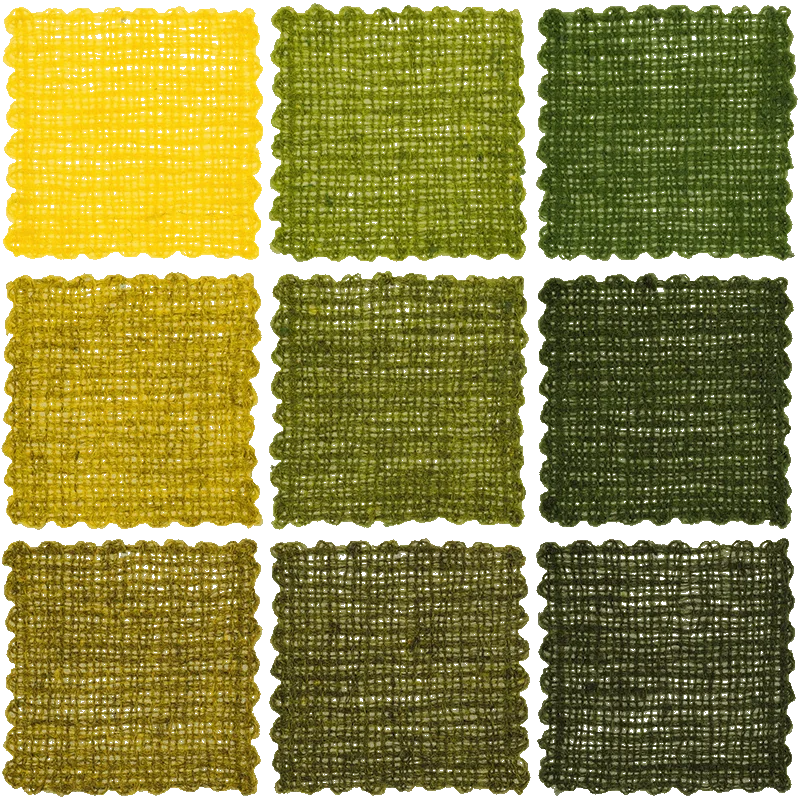
With all samples in place, the next step is building a colortrap that looks like a plant's real range rather than an arbitrary line between two points. An algorithm selects which samples belong as anchors. One of the checks looks at chroma: past a certain point, the wool's own color starts to dominate over the dye, and those samples would distort the gradient if included, so they get filtered out.
The pipeline itself runs in stages: the raw data starts in a Google Sheet, most of the processing happens in Python, and the result lands in a SQLite database.
The colortrap generator
Tuning that algorithm needed a way to see it working, and to question it. The colortrap generator grew out of that: it shows the automatically selected colortrap next to one you build by hand, sample by sample. Sometimes the automatic version is right. Sometimes picking a different set of anchors makes a better trap.
It's also just there to play with. Toggle dark wool in or out, and the palette shifts with it: without dark wool, you're only looking at the lighter half of a plant's range. The step size control works the same way lightness does in OKLCH: a step of 5 means a new sample every 5% of lightness.
Select samples for the custom colortrap |
|||||
|---|---|---|---|---|---|
|
Autoselect
|
Wool
|
Lightness
|
Chroma
|
Hue
|
Autoselect
Custom
The tool works best on desktop, though it still works on a small screen, just not as comfortably. I'm not a backend developer, but working closely with AI, staying firmly in control of it, turns out to be enough to build something like this. That's also why the interface stays simple: less that can go wrong in code I didn't write by hand.
UI colors
The same database also produces something more practical: color tokens, named colors used consistently across the website, the book, and eventually social media.
A token is just a name attached to a specific color value, so "border grey" or "link blue" means the same thing everywhere it's used, instead of being redefined by hand each time.
Because these tokens end up as real text and interface colors, contrast matters. I check every token against WCAG accessibility guidelines for luminance and contrast. Light grey tones, for instance, get lighter once the surrounding text reaches 18px, since larger text can carry less contrast and still stay legible.
The current palette runs through walnut, indigo, and goldenrod: a warm brown, a cool blue, and a yellow that, blended with dark wool, reads as green even though its hue never actually moves there, chroma does that work, not hue. Together they cover enough range to build a full set of tokens from.
None of this is finished. New plants get tested, the algorithm gets adjusted, and every addition reshapes the gradients slightly. What holds it together is the database itself, one place where a decision about how to pick a color only has to be made once.